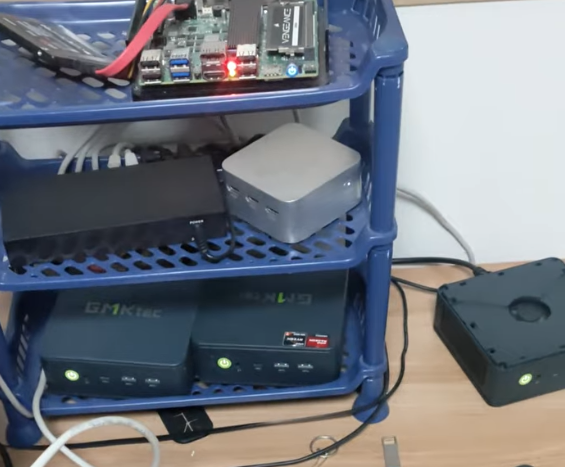
I use a GMKtec mini PC line that I picked up for about $130. The 5825U and 5700U barebone variants are regularly discounted on AliExpress, so I often buy them for homelab nodes.
Primary nodes: GMKtec mini PCs (Ryzen 7 5825U or 5700U barebone)
Memory: up to 64 GB RAM per GMKtec node
Storage: dual M.2 slots per GMKtec node
Network: dual 2.5 Gbps LAN per GMKtec node
Auxiliary node: Intel N100 mini PC with 16 GB RAM
Extra storage: 2x 500 GB SSD
Network gear: Keeplink switch and AX3000 router
flowchart LR
  Router[AX3000 Router] --> Switch[L2 Switch]
  Switch --> GMK[GMKtec Mini PCs]
  Switch --> N100[Intel N100 Node]
flowchart LR
  subgraph CP[Control Plane]
    M1[m1]
    M2[m2]
    M3[m3]
  end
  subgraph WK[Workers]
    W1[w1]
    W2[w2]
  end
  Client[(Client)] --> L2LB[Cilium L2LB IP Pool]
  L2LB --> Istio[Istio IngressGateway]
  M1 --- M2 --- M3
  W1 --> M1
  W2 --> M2
Control Plane: 3 nodes (stacked etcd)
Workers: 2 nodes
CNI: Cilium (use L2LB, no MetalLB)
Ingress: Istio
Storage: Rook
Logging: Elastic (ECK)
Note: In this homelab, the control plane nodes also run worker workloads. To allow scheduling on control plane nodes, include them in kube_node and set remove_master_taint: true (see below). If you want a dedicated control plane, omit them from kube_node and keep the taint.
---helm_enabled: truemetrics_server_enabled: truemetrics_server_kubelet_insecure_tls: true # homelab-only; use kubelet certs + set false in stricter setupslocal_path_provisioner_enabled: false # install in Part 3 (set true if you want Kubespray to manage it)
---# We set CNI to none during bootstrap because we will install and configure # Cilium manually in Part 2 to have full control over L2LB and Helm settings.kube_network_plugin: none# Cluster CIDRs (match with Cilium Helm install later)kube_service_addresses: 10.233.0.0/18kube_pods_subnet: 10.233.64.0/18kube_network_node_prefix: 24# Pin control plane to a version supported by your Kubespray branch (example below).# Do not use an unsupported version (e.g., v1.34.x) unless your branch explicitly supports it.kube_version: v1.29.7kube_image_repo: registry.k8s.io# Allow scheduling on control-plane nodes (homelab-only)remove_master_taint: true# Upstream DNS servers for CoreDNS/NodeLocalDNS.upstream_dns_servers: - 1.1.1.1 - 8.8.8.8# Health probe compatibility (homelab-only)kube_api_anonymous_auth: true
Security note: metrics_server_kubelet_insecure_tls, remove_master_taint, and kube_api_anonymous_auth are lab-only shortcuts. For stricter setups, set these to false and provide proper kubelet certs + auth.
You now have a 3M/2W RHEL cluster bootstrapped with Kubespray. In Part 2, we will install Cilium CNI to make the nodes 'Ready' and configure our operational baseline.
Homelabird
Sharing hands-on cloud infrastructure and DevOps experience. Writing about Kubernetes, Terraform, and observability, and documenting lessons learned as a solo operator.